
Решение проблем KPSN 4.0
Unable to verify the first certificate
Описание:
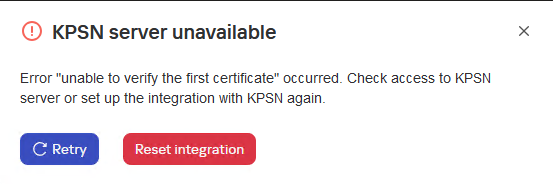
Текст ошибки
KPSN server unavailable
Error "unable to verify the first certificate" occurred. Check access to KPSN server or set up the integration with KPSN again.
KSC web console log
{"level":"info","version":"1.1.0.33","tags":[],"message":"[KPSN] [>>>] getConfigurationStatus in pluginServerApi start","timestamp":"2025-03-05T16:47:16.961Z","component":"plugin_kpsn","data":{"logContext":{"operationId":"zAiujrzgzm","pluginVersion":"1.1.0.33","pluginApiMethod":"getConfigurationStatus"}}}
{"level":"info","version":"1.1.0.33","tags":[],"message":"[KPSN] [PerServerStorage] getTenantId: no tenant id","timestamp":"2025-03-05T16:47:16.961Z","component":"plugin_kpsn","data":{"logContext":{"operationId":"zAiujrzgzm","pluginVersion":"1.1.0.33","pluginApiMethod":"getConfigurationStatus"}}}
{"level":"info","version":"1.1.0.33","tags":[],"message":"[KPSN] [PerServerStorage] getValue start","timestamp":"2025-03-05T16:47:16.961Z","component":"plugin_kpsn","data":{"logContext":{"operationId":"zAiujrzgzm","pluginVersion":"1.1.0.33","pluginApiMethod":"getConfigurationStatus"},"payload":{"key":"kpsn-backend-info","fullKey":"kpsn-backend-info"}}}
{"level":"info","version":"1.1.0.33","tags":[],"message":"[KPSN] [PerServerStorage] getValue success: key: \"kpsn-backend-info\"","timestamp":"2025-03-05T16:47:16.986Z","component":"plugin_kpsn","data":{"logContext":{"operationId":"zAiujrzgzm","pluginVersion":"1.1.0.33","pluginApiMethod":"getConfigurationStatus"}}}
{"level":"info","version":"1.1.0.33","tags":[],"message":"[KPSN] tokenCache:oxWlUyvqUS6XDMnytmZi cache get: success: key \"kpsn-token\"","timestamp":"2025-03-05T16:47:16.986Z","component":"plugin_kpsn","data":{"logContext":{"operationId":"zAiujrzgzm","pluginVersion":"1.1.0.33","pluginApiMethod":"getConfigurationStatus"}}}
{"level":"info","version":"1.1.0.33","tags":[],"message":"[KPSN] User token was found in cache","timestamp":"2025-03-05T16:47:16.986Z","component":"plugin_kpsn","data":{"logContext":{"operationId":"zAiujrzgzm","pluginVersion":"1.1.0.33","pluginApiMethod":"getConfigurationStatus"}}}
{"level":"info","version":"1.1.0.33","tags":[],"message":"[KPSN] [PerServerStorage] getTenantId: no tenant id","timestamp":"2025-03-05T16:47:16.991Z","component":"plugin_kpsn","data":{"logContext":{"operationId":"zAiujrzgzm","pluginVersion":"1.1.0.33","pluginApiMethod":"getConfigurationStatus"}}}
{"level":"info","version":"1.1.0.33","tags":[],"message":"[KPSN] [PerServerStorage] getValue start","timestamp":"2025-03-05T16:47:16.991Z","component":"plugin_kpsn","data":{"logContext":{"operationId":"zAiujrzgzm","pluginVersion":"1.1.0.33","pluginApiMethod":"getConfigurationStatus"},"payload":{"key":"kpsn-backend-info","fullKey":"kpsn-backend-info"}}}
{"level":"info","version":"1.1.0.33","tags":[],"message":"[KPSN] [PerServerStorage] getValue success: key: \"kpsn-backend-info\"","timestamp":"2025-03-05T16:47:16.999Z","component":"plugin_kpsn","data":{"logContext":{"operationId":"zAiujrzgzm","pluginVersion":"1.1.0.33","pluginApiMethod":"getConfigurationStatus"}}}
{"level":"warn","version":"1.1.0.33","tags":[],"message":"[KPSN] [ApiClient] https://lavkpsn4tests.vm.org:443 is unavailable.","timestamp":"2025-03-05T16:47:17.010Z","component":"plugin_kpsn","data":{"logContext":{"operationId":"zAiujrzgzm","pluginVersion":"1.1.0.33","pluginApiMethod":"getConfigurationStatus"}}}
{"level":"info","version":"1.1.0.33","tags":[],"message":"[KPSN] [PerServerStorage] getTenantId: no tenant id","timestamp":"2025-03-05T16:47:17.011Z","component":"plugin_kpsn","data":{"logContext":{"operationId":"zAiujrzgzm","pluginVersion":"1.1.0.33","pluginApiMethod":"getConfigurationStatus"}}}
{"level":"info","version":"1.1.0.33","tags":[],"message":"[KPSN] [PerServerStorage] getValue start","timestamp":"2025-03-05T16:47:17.011Z","component":"plugin_kpsn","data":{"logContext":{"operationId":"zAiujrzgzm","pluginVersion":"1.1.0.33","pluginApiMethod":"getConfigurationStatus"},"payload":{"key":"kpsn-backend-info","fullKey":"kpsn-backend-info"}}}
{"level":"info","version":"1.1.0.33","tags":[],"message":"[KPSN] [PerServerStorage] getValue success: key: \"kpsn-backend-info\"","timestamp":"2025-03-05T16:47:17.017Z","component":"plugin_kpsn","data":{"logContext":{"operationId":"zAiujrzgzm","pluginVersion":"1.1.0.33","pluginApiMethod":"getConfigurationStatus"}}}
{"level":"error","version":"1.1.0.33","tags":[],"message":"[KPSN] [<<<] getConfigurationStatus in pluginServerApi failure","timestamp":"2025-03-05T16:47:17.017Z","component":"plugin_kpsn","data":{"logContext":{"operationId":"zAiujrzgzm","pluginVersion":"1.1.0.33","pluginApiMethod":"getConfigurationStatus"},"payload":"unable to verify the first certificate"}}
Причина:
- Ошибка возникает при изменении сертификата центра сертификации (CA) в KPSN после интеграции с KSC.
- Что-то прерывает передачу данных между KSC и KPSN.
Решение:
Удалите интеграцию с KPSN и повторите попытку. Если ошибка повторится, проверьте сертификат KPSN в KSC. Откройте URL-адрес KPSN (https://<FQDN_KPSN>:443) в браузере и проверьте сертификат (учитывайте настройки прокси). Проверьте Authority Key Identifier и Issuer. Затем перейдите в KPSN и запустите:
kpsnctl certs print serverи проверьте keyid и Issuer . Информация в сертификате и в выводе команды должна совпадать (в указанных разделах). Пример:
Сертификат в браузере
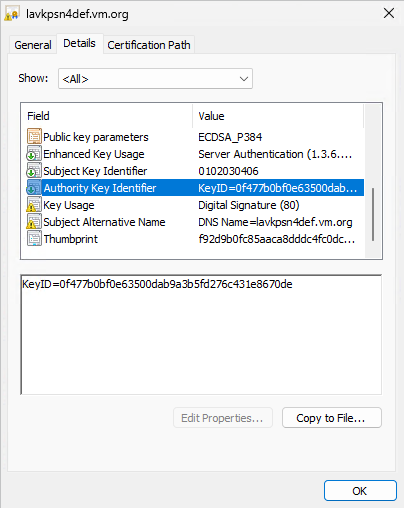
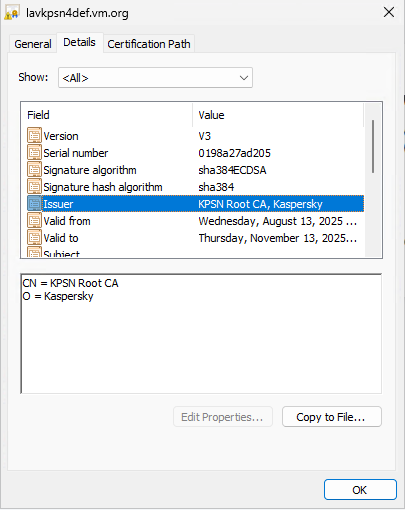
Информация о сертификации в KPSN
Информация о сертификате в KPSN
Certificate:
    Data:
        Version: 3 (0x2)
        Serial Number: 1755072614917 (0x198a27ad205)
    Signature Algorithm: ECDSA-SHA384
        Issuer: O=Kaspersky,CN=KPSN Root CA
        Validity
            Not Before: Aug 13 08:10:14 2025 UTC
            Not After : Nov 13 08:10:14 2025 UTC
        Subject:
        Subject Public Key Info:
            Public Key Algorithm: ECDSA
                Public-Key: (384 bit)
                X:
                    9b:1c:2f:80:75:ea:3d:ea:ba:13:50:85:ba:d7:71:
                    2b:34:da:d4:73:9e:fd:9c:bc:01:f2:43:d9:44:08:
                    ec:5f:bf:21:7d:0c:04:64:20:97:37:b0:05:1f:ab:
                    71:13:57
                Y:
                    c5:c1:0a:61:e0:69:bb:e1:5f:b8:e6:38:f2:b4:1c:
                    92:95:73:f0:cb:d2:e1:e7:63:77:50:45:12:38:45:
                    c3:ac:c7:d5:e7:54:50:02:b1:d3:e7:ea:e3:2e:da:
                    45:e9:75
                Curve: P-384
        X509v3 extensions:
            X509v3 Key Usage: critical
                Digital Signature
            X509v3 Extended Key Usage:
                Server Authentication
            X509v3 Subject Key Identifier:
                01:02:03:04:06
            X509v3 Authority Key Identifier:
                keyid:0F:47:7B:0B:F0:E6:35:00:DA:B9:A3:B5:FD:27:6C:43:1E:86:70:DE
            X509v3 Subject Alternative Name: critical
                DNS:lavkpsn4def.vm.org
    Signature Algorithm: ECDSA-SHA384
         30:64:02:30:6f:71:9d:6b:f3:9c:2e:5f:f9:46:fa:cb:c8:6c:
         4b:d8:e6:db:84:fd:e6:a6:ac:b6:68:3b:8e:77:59:fd:9c:09:
         fd:22:02:a7:99:c7:75:3f:81:07:9b:d6:27:22:db:ca:02:30:
         04:7c:af:c7:bb:ab:2b:7c:cd:17:19:88:61:d9:23:e9:c5:f2:
         54:66:d3:fc:f2:e3:0a:90:9a:6f:33:8c:8c:74:df:3d:c4:68:
         2a:2f:39:fa:b9:de:f4:9f:4d:6e:90:bd
Если вы попытаетесь выполнить эту проверку с хоста, на котором установлен KES и включено сканирование трафика, вы увидите следующее:
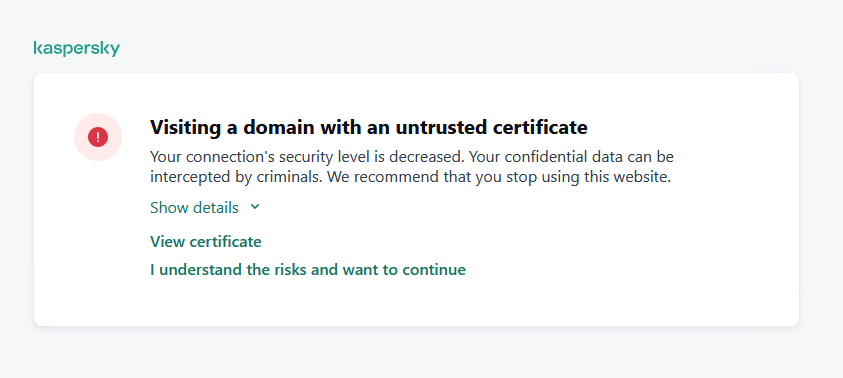
Не принимайте, сначала проверьте сертификат. Если вы примете, вы увидите только сертификат KES.
Getaddrinfo ENOTFOUND
Описание:
Текст ошибки
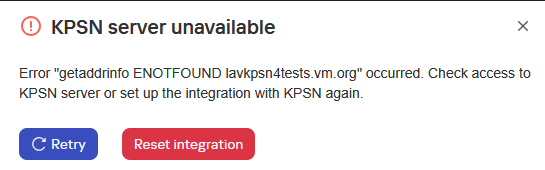
KPSN server unavailable
Error "getaddrinfo ENOTFOUND lavkpsn4tests.vm.org" occurred. Check access to KPSN server or set up the integration with KPSN again.
KSC web console log
{"level":"info","version":"1.1.0.33","tags":[],"message":"[KPSN] [>>>] getConfigurationStatus in pluginServerApi start","timestamp":"2025-03-05T16:23:16.624Z","component":"plugin_kpsn","data":{"logContext":{"operationId":"zEJC2aJ1YJ","pluginVersion":"1.1.0.33","pluginApiMethod":"getConfigurationStatus"}}}
{"level":"info","version":"1.1.0.33","tags":[],"message":"[KPSN] [PerServerStorage] getTenantId: no tenant id","timestamp":"2025-03-05T16:23:16.624Z","component":"plugin_kpsn","data":{"logContext":{"operationId":"zEJC2aJ1YJ","pluginVersion":"1.1.0.33","pluginApiMethod":"getConfigurationStatus"}}}
{"level":"info","version":"1.1.0.33","tags":[],"message":"[KPSN] [PerServerStorage] getValue start","timestamp":"2025-03-05T16:23:16.624Z","component":"plugin_kpsn","data":{"logContext":{"operationId":"zEJC2aJ1YJ","pluginVersion":"1.1.0.33","pluginApiMethod":"getConfigurationStatus"},"payload":{"key":"kpsn-backend-info","fullKey":"kpsn-backend-info"}}}
{"level":"info","version":"1.1.0.33","tags":[],"message":"[KPSN] [PerServerStorage] getValue success: key: \"kpsn-backend-info\"","timestamp":"2025-03-05T16:23:16.630Z","component":"plugin_kpsn","data":{"logContext":{"operationId":"zEJC2aJ1YJ","pluginVersion":"1.1.0.33","pluginApiMethod":"getConfigurationStatus"}}}
{"level":"info","version":"1.1.0.33","tags":[],"message":"[KPSN] tokenCache:oxWlUyvqUS6XDMnytmZi cache get: success: key \"kpsn-token\"","timestamp":"2025-03-05T16:23:16.631Z","component":"plugin_kpsn","data":{"logContext":{"operationId":"zEJC2aJ1YJ","pluginVersion":"1.1.0.33","pluginApiMethod":"getConfigurationStatus"}}}
{"level":"info","version":"1.1.0.33","tags":[],"message":"[KPSN] User token not found in cache","timestamp":"2025-03-05T16:23:16.631Z","component":"plugin_kpsn","data":{"logContext":{"operationId":"zEJC2aJ1YJ","pluginVersion":"1.1.0.33","pluginApiMethod":"getConfigurationStatus"}}}
{"level":"error","version":"1.1.0.33","tags":[],"message":"[KPSN] Cannot resolve user token.","timestamp":"2025-03-05T16:23:37.288Z","component":"plugin_kpsn","data":{"logContext":{"operationId":"zEJC2aJ1YJ","pluginVersion":"1.1.0.33","pluginApiMethod":"getConfigurationStatus"},"payload":{"bFinalized":true,"bSuccededFinalized":false,"lStateCode":4,"pStateData":{"KLBLAG_ERROR_INFO":{"type":"params","value":{"KLBLAG_ERROR_CODE":3604,"KLBLAG_ERROR_FNAME":"","KLBLAG_ERROR_LNUMBER":-1,"KLBLAG_ERROR_MODULE":"Error: [NO_SERVER_ERROR]: getaddrinfo ENOTFOUND lavkpsn4test.vm.org","KLBLAG_ERROR_MSG":"Error: [NO_SERVER_ERROR]: getaddrinfo ENOTFOUND lavkpsn4test.vm.org","KLBLAG_ERROR_SUBCODE":0}}},"lNextCheckDelay":0}}}
{"level":"info","version":"1.1.0.33","tags":[],"message":"[KPSN] tokenCache:oxWlUyvqUS6XDMnytmZi cache delete: success: key: \"kpsn-token\"","timestamp":"2025-03-05T16:23:37.288Z","component":"plugin_kpsn","data":{"logContext":{"operationId":"zEJC2aJ1YJ","pluginVersion":"1.1.0.33","pluginApiMethod":"getConfigurationStatus"}}}
{"level":"error","version":"1.1.0.33","tags":[],"message":"[KPSN] [<<<] getConfigurationStatus in pluginServerApi failure","timestamp":"2025-03-05T16:23:37.288Z","component":"plugin_kpsn","data":{"logContext":{"operationId":"zEJC2aJ1YJ","pluginVersion":"1.1.0.33","pluginApiMethod":"getConfigurationStatus"},"payload":"Error: getaddrinfo ENOTFOUND lavkpsn4test.vm.org"}}
Причина:
Ошибка при разрешении имени KPSN.
Решение:
Проверьте, может ли KSC разрешить имя KPSN:
nslookup lavkpsn4test.vm.orgИзмените имя lavkpsn4test.vm.org на фактическое имя KPSN. Также проверьте подключение к KPSN через порт 443. Это можно сделать с помощью telnet или tnc (из powershell). Пример команды:
tnc lavkpsn4tests.vm.org -Port 443Failed to get information from KPSN server
Описание:
Текст ошибки
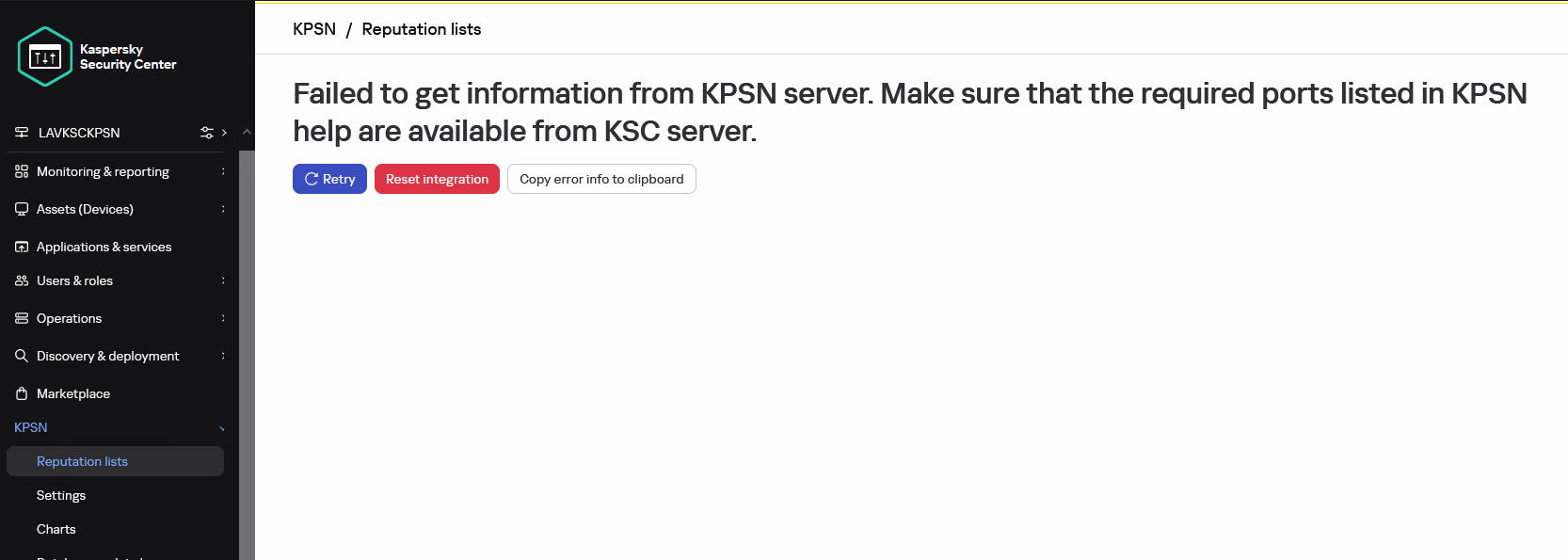
Failed to get information from KPSN server. Make sure that the required ports listed in KPSN help are available from KSC server.
Cannot resolve user token.
KSC web console log
{"level":"info","version":"1.1.0.33","tags":[],"message":"[KPSN] [>>>] getConfigurationStatus in pluginServerApi start","timestamp":"2025-02-11T12:53:48.094Z","component":"plugin_kpsn","data":{"logContext":{"operationId":"Kx5u7AbEU4","pluginVersion":"1.1.0.33","pluginApiMethod":"getConfigurationStatus"}}}
{"level":"info","version":"1.1.0.33","tags":[],"message":"[KPSN] [PerServerStorage] getTenantId: no tenant id","timestamp":"2025-02-11T12:53:48.094Z","component":"plugin_kpsn","data":{"logContext":{"operationId":"Kx5u7AbEU
","pluginVersion":"1.1.0.33","pluginApiMethod":"getConfigurationStatus"}}}
{"level":"info","version":"1.1.0.33","tags":[],"message":"[KPSN] [PerServerStorage] getValue start","timestamp":"2025-02-11T12:53:48.094Z","component":"plugin_kpsn","data":{"logContext":{"operationId":"Kx5u7AbEU4","pluginVersion":"1.1.0.33","pluginApiMethod":"getConfigurationStatus"},"payload":{"key":"kpsn-backend-info","fullKey":"kpsn-backend-info"}}}
{"level":"info","version":"1.1.0.33","tags":[],"message":"[KPSN] [PerServerStorage] getValue success: key: \"kpsn-backend-info\"","timestamp":"2025-02-11T12:53:48.107Z","component":"plugin_kpsn","data":{"logContext":{"operationId":"Kx5u7AbEU4","pluginVersion":"1.1.0.33","pluginApiMethod":"getConfigurationStatus"}}}
{"level":"info","version":"1.1.0.33","tags":[],"message":"[KPSN] tokenCache:7IGSh2K4ZGN5I0lbL3dd cache get: success: key \"kpsn-token\"","timestamp":"2025-02-11T12:53:48.108Z","component":"plugin_kpsn","data":{"logContext":{"operationId":"Kx5u7AbEU4","pluginVersion":"1.1.0.33","pluginApiMethod":"getConfigurationStatus"}}}
{"level":"info","version":"1.1.0.33","tags":[],"message":"[KPSN] User token not found in cache","timestamp":"2025-02-11T12:53:48.108Z","component":"plugin_kpsn","data":{"logContext":{"operationId":"Kx5u7AbEU4","pluginVersion":"1.1.0.33","pluginApiMethod":"getConfigurationStatus"}}}
{"level":"error","version":"1.1.0.33","tags":[],"message":"[KPSN] Cannot resolve user token.","timestamp":"2025-02-11T12:53:48.128Z","component":"plugin_kpsn","data":{"logContext":{"operationId":"Kx5u7AbEU4","pluginVersion":"1.1.0.33","pluginApiMethod":"getConfigurationStatus"}}}
{"level":"info","version":"1.1.0.33","tags":[],"message":"[KPSN] tokenCache:7IGSh2K4ZGN5I0lbL3dd cache delete: success: key: \"kpsn-token\"","timestamp":"2025-02-11T12:53:48.128Z","component":"plugin_kpsn","data":{"logContext":{"operationId":"Kx5u7AbEU4","pluginVersion":"1.1.0.33","pluginApiMethod":"getConfigurationStatus"}}}
{"level":"error","version":"1.1.0.33","tags":[],"message":"[KPSN] [<<<] getConfigurationStatus in pluginServerApi failure","timestamp":"2025-02-11T12:53:48.128Z","component":"plugin_kpsn","data":{"logContext":{"operationId":"Kx5u7AbEU4","pluginVersion":"1.1.0.33","pluginApiMethod":"getConfigurationStatus"},"payload":"Cannot resolve user token."}}
Причина:
Произошла ошибка в консоли службы NWC: служба NWC была перезапущена, опция «Фоновое соединение для интеграции» (Параметры > Интеграция) была отключена.
Или KSC не может подключиться к адресу KPSN.
Решение:
Чтобы исправить эту ошибку:
- Перезапустите службу Kaspersky Security Center Service Web Console.
- Откройте новую вкладку в браузере и подключитесь к веб консоли KSC.
- Отключите фоновое соединение для интеграции, если оно было включено. Сохраните изменения.
- Включите эту функцию. Примите изменения прав доступа и сохраните.
Также проверьте, можно ли разрешить имя KPSN из KSC с помощью nslookup.
Timeout of 15000ms was exceeded
Описание:
Текст ошибки
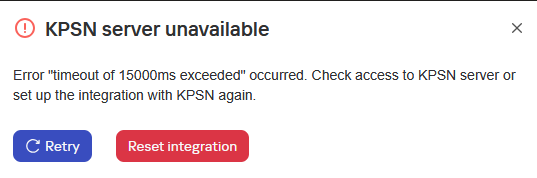
KPSN server unavailable
Error "timeout of 15000ms exceeded" occurred. Check access to KPSN server or set up the integration with KPSN again.
KSC web console log
{"level":"info","version":"1.1.0.33","tags":[],"message":"[KPSN] [>>>] executeCommand in productApi start","timestamp":"2025-03-05T13:37:29.721Z","component":"plugin_kpsn","data":{"logContext":{"operationId":"wh8yi1SepJ","pluginVersion":"1.1.0.33","pluginApiMethod":"executeCommand"}}}
{"level":"info","version":"1.1.0.33","tags":[],"message":"[KPSN] executeCommand start","timestamp":"2025-03-05T13:37:29.721Z","component":"plugin_kpsn","data":{"logContext":{"operationId":"wh8yi1SepJ","pluginVersion":"1.1.0.33","pluginApiMethod":"executeCommand"},"payload":"IssueUserToken"}}
{"level":"info","version":"1.1.0.33","tags":[],"message":"[KPSN] get user access token","timestamp":"2025-03-05T13:37:29.722Z","component":"plugin_kpsn","data":{"logContext":{"operationId":"wh8yi1SepJ","pluginVersion":"1.1.0.33","pluginApiMethod":"executeCommand"},"payload":{"serverId":"fb5e4e2c-fbfc-424e-a1c2-79d65e651239","userId":"sid_010500000000000515000000E2CA5270A67C21589095F045F4010000","userName":"LAVKSCKPSN\\Administrator","accessRights":{"FUNC_AREA_KPSN_API":4,"FUNC_AREA_KPSN_CONFIGURATION":4,"FUNC_AREA_KPSN_FILE_REPUTATION":4,"FUNC_AREA_KPSN_URL_REPUTATION":4}}}}
{"level":"info","version":"1.1.0.33","tags":[],"message":"[KPSN] [PerServerStorage] getTenantId: no tenant id","timestamp":"2025-03-05T13:37:29.722Z","component":"plugin_kpsn","data":{"logContext":{"operationId":"wh8yi1SepJ","pluginVersion":"1.1.0.33","pluginApiMethod":"executeCommand"}}}
{"level":"info","version":"1.1.0.33","tags":[],"message":"[KPSN] [PerServerStorage] getValue start","timestamp":"2025-03-05T13:37:29.722Z","component":"plugin_kpsn","data":{"logContext":{"operationId":"wh8yi1SepJ","pluginVersion":"1.1.0.33","pluginApiMethod":"executeCommand"},"payload":{"key":"kpsn-backend-info","fullKey":"kpsn-backend-info"}}}
{"level":"info","version":"1.1.0.33","tags":[],"message":"[KPSN] [PerServerStorage] getValue success: key: \"kpsn-backend-info\"","timestamp":"2025-03-05T13:37:29.728Z","component":"plugin_kpsn","data":{"logContext":{"operationId":"wh8yi1SepJ","pluginVersion":"1.1.0.33","pluginApiMethod":"executeCommand"}}}
{"level":"warn","version":"1.1.0.33","tags":[],"message":"[KPSN] [ApiClient] https://lavkpsn4test.vm.org:443 is unavailable.","timestamp":"2025-03-05T13:37:44.758Z","component":"plugin_kpsn","data":{"logContext":{"operationId":"wh8yi1SepJ","pluginVersion":"1.1.0.33","pluginApiMethod":"executeCommand"}}}
{"level":"info","version":"1.1.0.33","tags":[],"message":"[KPSN] [PerServerStorage] getTenantId: no tenant id","timestamp":"2025-03-05T13:37:44.758Z","component":"plugin_kpsn","data":{"logContext":{"operationId":"wh8yi1SepJ","pluginVersion":"1.1.0.33","pluginApiMethod":"executeCommand"}}}
{"level":"info","version":"1.1.0.33","tags":[],"message":"[KPSN] [PerServerStorage] getValue start","timestamp":"2025-03-05T13:37:44.758Z","component":"plugin_kpsn","data":{"logContext":{"operationId":"wh8yi1SepJ","pluginVersion":"1.1.0.33","pluginApiMethod":"executeCommand"},"payload":{"key":"kpsn-backend-info","fullKey":"kpsn-backend-info"}}}
{"level":"info","version":"1.1.0.33","tags":[],"message":"[KPSN] [PerServerStorage] getValue success: key: \"kpsn-backend-info\"","timestamp":"2025-03-05T13:37:44.766Z","component":"plugin_kpsn","data":{"logContext":{"operationId":"wh8yi1SepJ","pluginVersion":"1.1.0.33","pluginApiMethod":"executeCommand"}}}
{"level":"error","version":"1.1.0.33","tags":[],"message":"[KPSN] [<<<] executeCommand in productApi failure","timestamp":"2025-03-05T13:37:44.766Z","component":"plugin_kpsn","data":{"logContext":{"operationId":"wh8yi1SepJ","pluginVersion":"1.1.0.33","pluginApiMethod":"executeCommand"},"payload":{"message":"[NO_SERVER_ERROR]: timeout of 15000ms exceeded","type":"no working server"}}}
Причина:
KSC не может подключиться к KPSN
Решение:
Проверьте соединение через tnc
tnc lavkpsn4tests.vm.org -Port 443
Error: self-signed certificate
Описание:
Текст ошибки
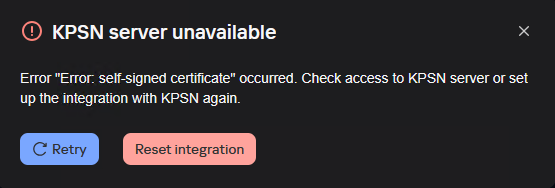
KPSN server unavailable
Error "Error: self-signed certificate" occurred. Check access to KPSN server or set up the integration with KPSN again.
Причина:
Неверный адрес в сертификате сервера.
Решение:
- В KPSN выполните:
Проверьте имя KPSN (например, DNS: lavkpsn4tests)kpsnctl certs print server
Правильное имя должно быть: например, lavkpsn4tests.vm.org (FQDN!) - Измените имя в сертификате сервера, указав фактическое имя (FQDN)
kpsnctl certs rotate server --months 12 --external-hostname <FQDN>
Configurations files not downloaded
Описание:

Текст ошибки
Configuration files not downloaded
Причина:
После интеграции, активации и настройки вам потребуются конфигурационные файлы для подключения других наших продуктов: KATA, KSMG, KSC и др.
Эта ошибка всегда означает, что KSC или KPSN не могут связаться с ksn-pub-5.kaspersky-labs.com
Решение: