# Диагностика и решение проблем
# Решение проблем KPSN 4.0
Unable to verify the first certificate
**Описание:**
[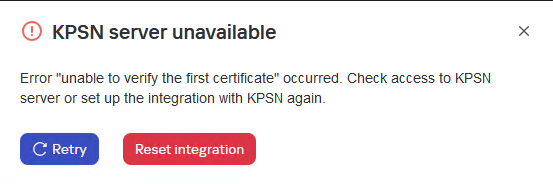](https://antiapt-community.ru/uploads/images/gallery/2025-12/CP7z3P1LklRIdFIS-image.png)
Текст ошибки
*KPSN server unavailable*
*Error "unable to verify the first certificate" occurred. Check access to KPSN server or set up the integration with KPSN again.*
KSC web console log
```json
{"level":"info","version":"1.1.0.33","tags":[],"message":"[KPSN] [>>>] getConfigurationStatus in pluginServerApi start","timestamp":"2025-03-05T16:47:16.961Z","component":"plugin_kpsn","data":{"logContext":{"operationId":"zAiujrzgzm","pluginVersion":"1.1.0.33","pluginApiMethod":"getConfigurationStatus"}}}
{"level":"info","version":"1.1.0.33","tags":[],"message":"[KPSN] [PerServerStorage] getTenantId: no tenant id","timestamp":"2025-03-05T16:47:16.961Z","component":"plugin_kpsn","data":{"logContext":{"operationId":"zAiujrzgzm","pluginVersion":"1.1.0.33","pluginApiMethod":"getConfigurationStatus"}}}
{"level":"info","version":"1.1.0.33","tags":[],"message":"[KPSN] [PerServerStorage] getValue start","timestamp":"2025-03-05T16:47:16.961Z","component":"plugin_kpsn","data":{"logContext":{"operationId":"zAiujrzgzm","pluginVersion":"1.1.0.33","pluginApiMethod":"getConfigurationStatus"},"payload":{"key":"kpsn-backend-info","fullKey":"kpsn-backend-info"}}}
{"level":"info","version":"1.1.0.33","tags":[],"message":"[KPSN] [PerServerStorage] getValue success: key: \"kpsn-backend-info\"","timestamp":"2025-03-05T16:47:16.986Z","component":"plugin_kpsn","data":{"logContext":{"operationId":"zAiujrzgzm","pluginVersion":"1.1.0.33","pluginApiMethod":"getConfigurationStatus"}}}
{"level":"info","version":"1.1.0.33","tags":[],"message":"[KPSN] tokenCache:oxWlUyvqUS6XDMnytmZi cache get: success: key \"kpsn-token\"","timestamp":"2025-03-05T16:47:16.986Z","component":"plugin_kpsn","data":{"logContext":{"operationId":"zAiujrzgzm","pluginVersion":"1.1.0.33","pluginApiMethod":"getConfigurationStatus"}}}
{"level":"info","version":"1.1.0.33","tags":[],"message":"[KPSN] User token was found in cache","timestamp":"2025-03-05T16:47:16.986Z","component":"plugin_kpsn","data":{"logContext":{"operationId":"zAiujrzgzm","pluginVersion":"1.1.0.33","pluginApiMethod":"getConfigurationStatus"}}}
{"level":"info","version":"1.1.0.33","tags":[],"message":"[KPSN] [PerServerStorage] getTenantId: no tenant id","timestamp":"2025-03-05T16:47:16.991Z","component":"plugin_kpsn","data":{"logContext":{"operationId":"zAiujrzgzm","pluginVersion":"1.1.0.33","pluginApiMethod":"getConfigurationStatus"}}}
{"level":"info","version":"1.1.0.33","tags":[],"message":"[KPSN] [PerServerStorage] getValue start","timestamp":"2025-03-05T16:47:16.991Z","component":"plugin_kpsn","data":{"logContext":{"operationId":"zAiujrzgzm","pluginVersion":"1.1.0.33","pluginApiMethod":"getConfigurationStatus"},"payload":{"key":"kpsn-backend-info","fullKey":"kpsn-backend-info"}}}
{"level":"info","version":"1.1.0.33","tags":[],"message":"[KPSN] [PerServerStorage] getValue success: key: \"kpsn-backend-info\"","timestamp":"2025-03-05T16:47:16.999Z","component":"plugin_kpsn","data":{"logContext":{"operationId":"zAiujrzgzm","pluginVersion":"1.1.0.33","pluginApiMethod":"getConfigurationStatus"}}}
{"level":"warn","version":"1.1.0.33","tags":[],"message":"[KPSN] [ApiClient] https://lavkpsn4tests.vm.org:443 is unavailable.","timestamp":"2025-03-05T16:47:17.010Z","component":"plugin_kpsn","data":{"logContext":{"operationId":"zAiujrzgzm","pluginVersion":"1.1.0.33","pluginApiMethod":"getConfigurationStatus"}}}
{"level":"info","version":"1.1.0.33","tags":[],"message":"[KPSN] [PerServerStorage] getTenantId: no tenant id","timestamp":"2025-03-05T16:47:17.011Z","component":"plugin_kpsn","data":{"logContext":{"operationId":"zAiujrzgzm","pluginVersion":"1.1.0.33","pluginApiMethod":"getConfigurationStatus"}}}
{"level":"info","version":"1.1.0.33","tags":[],"message":"[KPSN] [PerServerStorage] getValue start","timestamp":"2025-03-05T16:47:17.011Z","component":"plugin_kpsn","data":{"logContext":{"operationId":"zAiujrzgzm","pluginVersion":"1.1.0.33","pluginApiMethod":"getConfigurationStatus"},"payload":{"key":"kpsn-backend-info","fullKey":"kpsn-backend-info"}}}
{"level":"info","version":"1.1.0.33","tags":[],"message":"[KPSN] [PerServerStorage] getValue success: key: \"kpsn-backend-info\"","timestamp":"2025-03-05T16:47:17.017Z","component":"plugin_kpsn","data":{"logContext":{"operationId":"zAiujrzgzm","pluginVersion":"1.1.0.33","pluginApiMethod":"getConfigurationStatus"}}}
{"level":"error","version":"1.1.0.33","tags":[],"message":"[KPSN] [<<<] getConfigurationStatus in pluginServerApi failure","timestamp":"2025-03-05T16:47:17.017Z","component":"plugin_kpsn","data":{"logContext":{"operationId":"zAiujrzgzm","pluginVersion":"1.1.0.33","pluginApiMethod":"getConfigurationStatus"},"payload":"unable to verify the first certificate"}}
```
**Причина:**
1. Ошибка возникает при изменении сертификата центра сертификации (CA) в KPSN после интеграции с KSC.
2. Что-то прерывает передачу данных между KSC и KPSN.
**Решение:**
Удалите интеграцию с KPSN и повторите попытку. Если ошибка повторится, проверьте сертификат KPSN в KSC. Откройте URL-адрес KPSN (https://<FQDN\_KPSN>:443) в браузере и проверьте сертификат (учитывайте настройки прокси). Проверьте **Authority Key Identifier** и **Issuer**. Затем перейдите в KPSN и запустите:
```bash
kpsnctl certs print server
```
и проверьте **keyid** и **Issuer** . Информация в сертификате и в выводе команды должна совпадать (в указанных разделах). **Пример:****Сертификат в браузере**
[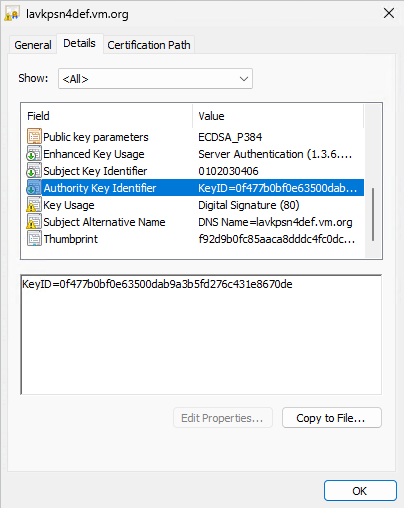](https://antiapt-community.ru/uploads/images/gallery/2025-12/tS4R76mBJl7tLyrj-image.png)[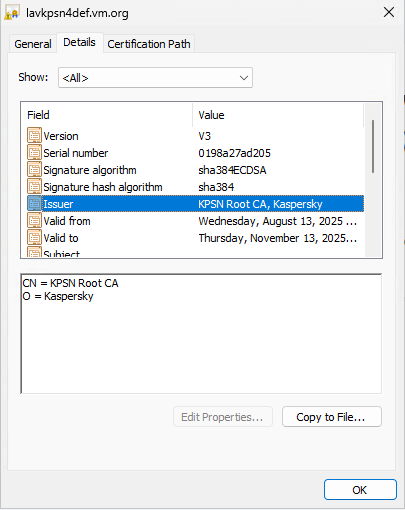](https://antiapt-community.ru/uploads/images/gallery/2025-12/K7aOmbpqmmKzTkS7-image.png)
**Информация о сертификации в KPSN**
Информация о сертификате в KPSN
```css
Certificate:
Data:
Version: 3 (0x2)
Serial Number: 1755072614917 (0x198a27ad205)
Signature Algorithm: ECDSA-SHA384
Issuer: O=Kaspersky,CN=KPSN Root CA
Validity
Not Before: Aug 13 08:10:14 2025 UTC
Not After : Nov 13 08:10:14 2025 UTC
Subject:
Subject Public Key Info:
Public Key Algorithm: ECDSA
Public-Key: (384 bit)
X:
9b:1c:2f:80:75:ea:3d:ea:ba:13:50:85:ba:d7:71:
2b:34:da:d4:73:9e:fd:9c:bc:01:f2:43:d9:44:08:
ec:5f:bf:21:7d:0c:04:64:20:97:37:b0:05:1f:ab:
71:13:57
Y:
c5:c1:0a:61:e0:69:bb:e1:5f:b8:e6:38:f2:b4:1c:
92:95:73:f0:cb:d2:e1:e7:63:77:50:45:12:38:45:
c3:ac:c7:d5:e7:54:50:02:b1:d3:e7:ea:e3:2e:da:
45:e9:75
Curve: P-384
X509v3 extensions:
X509v3 Key Usage: critical
Digital Signature
X509v3 Extended Key Usage:
Server Authentication
X509v3 Subject Key Identifier:
01:02:03:04:06
X509v3 Authority Key Identifier:
keyid:0F:47:7B:0B:F0:E6:35:00:DA:B9:A3:B5:FD:27:6C:43:1E:86:70:DE
X509v3 Subject Alternative Name: critical
DNS:lavkpsn4def.vm.org
Signature Algorithm: ECDSA-SHA384
30:64:02:30:6f:71:9d:6b:f3:9c:2e:5f:f9:46:fa:cb:c8:6c:
4b:d8:e6:db:84:fd:e6:a6:ac:b6:68:3b:8e:77:59:fd:9c:09:
fd:22:02:a7:99:c7:75:3f:81:07:9b:d6:27:22:db:ca:02:30:
04:7c:af:c7:bb:ab:2b:7c:cd:17:19:88:61:d9:23:e9:c5:f2:
54:66:d3:fc:f2:e3:0a:90:9a:6f:33:8c:8c:74:df:3d:c4:68:
2a:2f:39:fa:b9:de:f4:9f:4d:6e:90:bd
```
Если вы попытаетесь выполнить эту проверку с хоста, на котором установлен KES и включено сканирование трафика, вы увидите следующее:
[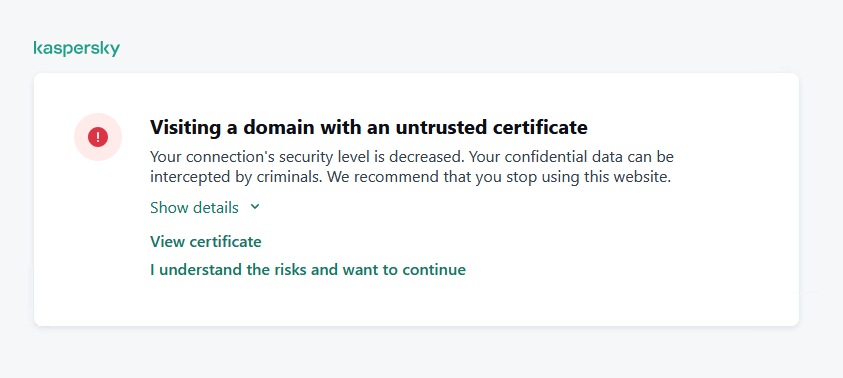](https://antiapt-community.ru/uploads/images/gallery/2025-12/DznSWyP9UsIv9b4A-image.png)
Не принимайте, сначала проверьте сертификат. Если вы примете, вы увидите только сертификат KES.Getaddrinfo ENOTFOUND
**Описание:**
[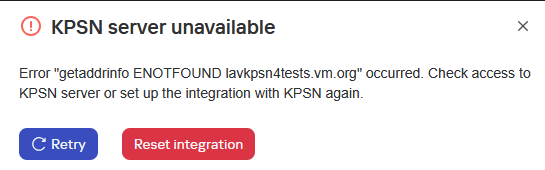](https://antiapt-community.ru/uploads/images/gallery/2025-12/6eW2tjpVZFVXWADT-image.png)
Текст ошибки
*KPSN server unavailable*
*Error "getaddrinfo ENOTFOUND lavkpsn4tests.vm.org" occurred. Check access to KPSN server or set up the integration with KPSN again.*
KSC web console log
```json
{"level":"info","version":"1.1.0.33","tags":[],"message":"[KPSN] [>>>] getConfigurationStatus in pluginServerApi start","timestamp":"2025-03-05T16:23:16.624Z","component":"plugin_kpsn","data":{"logContext":{"operationId":"zEJC2aJ1YJ","pluginVersion":"1.1.0.33","pluginApiMethod":"getConfigurationStatus"}}}
{"level":"info","version":"1.1.0.33","tags":[],"message":"[KPSN] [PerServerStorage] getTenantId: no tenant id","timestamp":"2025-03-05T16:23:16.624Z","component":"plugin_kpsn","data":{"logContext":{"operationId":"zEJC2aJ1YJ","pluginVersion":"1.1.0.33","pluginApiMethod":"getConfigurationStatus"}}}
{"level":"info","version":"1.1.0.33","tags":[],"message":"[KPSN] [PerServerStorage] getValue start","timestamp":"2025-03-05T16:23:16.624Z","component":"plugin_kpsn","data":{"logContext":{"operationId":"zEJC2aJ1YJ","pluginVersion":"1.1.0.33","pluginApiMethod":"getConfigurationStatus"},"payload":{"key":"kpsn-backend-info","fullKey":"kpsn-backend-info"}}}
{"level":"info","version":"1.1.0.33","tags":[],"message":"[KPSN] [PerServerStorage] getValue success: key: \"kpsn-backend-info\"","timestamp":"2025-03-05T16:23:16.630Z","component":"plugin_kpsn","data":{"logContext":{"operationId":"zEJC2aJ1YJ","pluginVersion":"1.1.0.33","pluginApiMethod":"getConfigurationStatus"}}}
{"level":"info","version":"1.1.0.33","tags":[],"message":"[KPSN] tokenCache:oxWlUyvqUS6XDMnytmZi cache get: success: key \"kpsn-token\"","timestamp":"2025-03-05T16:23:16.631Z","component":"plugin_kpsn","data":{"logContext":{"operationId":"zEJC2aJ1YJ","pluginVersion":"1.1.0.33","pluginApiMethod":"getConfigurationStatus"}}}
{"level":"info","version":"1.1.0.33","tags":[],"message":"[KPSN] User token not found in cache","timestamp":"2025-03-05T16:23:16.631Z","component":"plugin_kpsn","data":{"logContext":{"operationId":"zEJC2aJ1YJ","pluginVersion":"1.1.0.33","pluginApiMethod":"getConfigurationStatus"}}}
{"level":"error","version":"1.1.0.33","tags":[],"message":"[KPSN] Cannot resolve user token.","timestamp":"2025-03-05T16:23:37.288Z","component":"plugin_kpsn","data":{"logContext":{"operationId":"zEJC2aJ1YJ","pluginVersion":"1.1.0.33","pluginApiMethod":"getConfigurationStatus"},"payload":{"bFinalized":true,"bSuccededFinalized":false,"lStateCode":4,"pStateData":{"KLBLAG_ERROR_INFO":{"type":"params","value":{"KLBLAG_ERROR_CODE":3604,"KLBLAG_ERROR_FNAME":"","KLBLAG_ERROR_LNUMBER":-1,"KLBLAG_ERROR_MODULE":"Error: [NO_SERVER_ERROR]: getaddrinfo ENOTFOUND lavkpsn4test.vm.org","KLBLAG_ERROR_MSG":"Error: [NO_SERVER_ERROR]: getaddrinfo ENOTFOUND lavkpsn4test.vm.org","KLBLAG_ERROR_SUBCODE":0}}},"lNextCheckDelay":0}}}
{"level":"info","version":"1.1.0.33","tags":[],"message":"[KPSN] tokenCache:oxWlUyvqUS6XDMnytmZi cache delete: success: key: \"kpsn-token\"","timestamp":"2025-03-05T16:23:37.288Z","component":"plugin_kpsn","data":{"logContext":{"operationId":"zEJC2aJ1YJ","pluginVersion":"1.1.0.33","pluginApiMethod":"getConfigurationStatus"}}}
{"level":"error","version":"1.1.0.33","tags":[],"message":"[KPSN] [<<<] getConfigurationStatus in pluginServerApi failure","timestamp":"2025-03-05T16:23:37.288Z","component":"plugin_kpsn","data":{"logContext":{"operationId":"zEJC2aJ1YJ","pluginVersion":"1.1.0.33","pluginApiMethod":"getConfigurationStatus"},"payload":"Error: getaddrinfo ENOTFOUND lavkpsn4test.vm.org"}}
```
**Причина:**
Ошибка при разрешении имени KPSN.
**Решение:**
Проверьте, может ли KSC разрешить имя KPSN:
```bash
nslookup lavkpsn4test.vm.org
```
Измените имя **lavkpsn4test.vm.org** на фактическое имя KPSN. Также проверьте подключение к KPSN через порт 443. Это можно сделать с помощью **telnet** или **tnc** (из powershell). Пример команды:
```powershell
tnc lavkpsn4tests.vm.org -Port 443
```
Failed to get information from KPSN server
**Описание:**
[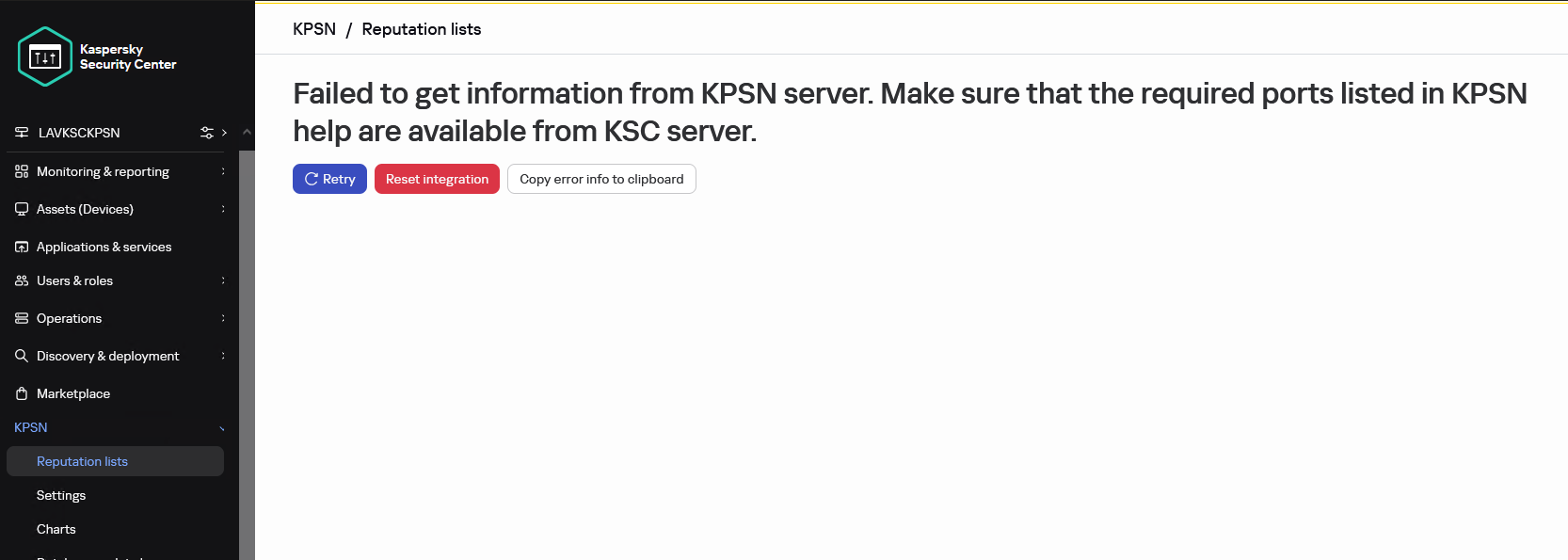](https://antiapt-community.ru/uploads/images/gallery/2025-12/wnF5Jyw173zhYW52-image.png)
Текст ошибки
*Failed to get information from KPSN server. Make sure that the required ports listed in KPSN help are available from KSC server.*
*Cannot resolve user token.*
KSC web console log
```json
{"level":"info","version":"1.1.0.33","tags":[],"message":"[KPSN] [>>>] getConfigurationStatus in pluginServerApi start","timestamp":"2025-02-11T12:53:48.094Z","component":"plugin_kpsn","data":{"logContext":{"operationId":"Kx5u7AbEU4","pluginVersion":"1.1.0.33","pluginApiMethod":"getConfigurationStatus"}}}
{"level":"info","version":"1.1.0.33","tags":[],"message":"[KPSN] [PerServerStorage] getTenantId: no tenant id","timestamp":"2025-02-11T12:53:48.094Z","component":"plugin_kpsn","data":{"logContext":{"operationId":"Kx5u7AbEU
","pluginVersion":"1.1.0.33","pluginApiMethod":"getConfigurationStatus"}}}
{"level":"info","version":"1.1.0.33","tags":[],"message":"[KPSN] [PerServerStorage] getValue start","timestamp":"2025-02-11T12:53:48.094Z","component":"plugin_kpsn","data":{"logContext":{"operationId":"Kx5u7AbEU4","pluginVersion":"1.1.0.33","pluginApiMethod":"getConfigurationStatus"},"payload":{"key":"kpsn-backend-info","fullKey":"kpsn-backend-info"}}}
{"level":"info","version":"1.1.0.33","tags":[],"message":"[KPSN] [PerServerStorage] getValue success: key: \"kpsn-backend-info\"","timestamp":"2025-02-11T12:53:48.107Z","component":"plugin_kpsn","data":{"logContext":{"operationId":"Kx5u7AbEU4","pluginVersion":"1.1.0.33","pluginApiMethod":"getConfigurationStatus"}}}
{"level":"info","version":"1.1.0.33","tags":[],"message":"[KPSN] tokenCache:7IGSh2K4ZGN5I0lbL3dd cache get: success: key \"kpsn-token\"","timestamp":"2025-02-11T12:53:48.108Z","component":"plugin_kpsn","data":{"logContext":{"operationId":"Kx5u7AbEU4","pluginVersion":"1.1.0.33","pluginApiMethod":"getConfigurationStatus"}}}
{"level":"info","version":"1.1.0.33","tags":[],"message":"[KPSN] User token not found in cache","timestamp":"2025-02-11T12:53:48.108Z","component":"plugin_kpsn","data":{"logContext":{"operationId":"Kx5u7AbEU4","pluginVersion":"1.1.0.33","pluginApiMethod":"getConfigurationStatus"}}}
{"level":"error","version":"1.1.0.33","tags":[],"message":"[KPSN] Cannot resolve user token.","timestamp":"2025-02-11T12:53:48.128Z","component":"plugin_kpsn","data":{"logContext":{"operationId":"Kx5u7AbEU4","pluginVersion":"1.1.0.33","pluginApiMethod":"getConfigurationStatus"}}}
{"level":"info","version":"1.1.0.33","tags":[],"message":"[KPSN] tokenCache:7IGSh2K4ZGN5I0lbL3dd cache delete: success: key: \"kpsn-token\"","timestamp":"2025-02-11T12:53:48.128Z","component":"plugin_kpsn","data":{"logContext":{"operationId":"Kx5u7AbEU4","pluginVersion":"1.1.0.33","pluginApiMethod":"getConfigurationStatus"}}}
{"level":"error","version":"1.1.0.33","tags":[],"message":"[KPSN] [<<<] getConfigurationStatus in pluginServerApi failure","timestamp":"2025-02-11T12:53:48.128Z","component":"plugin_kpsn","data":{"logContext":{"operationId":"Kx5u7AbEU4","pluginVersion":"1.1.0.33","pluginApiMethod":"getConfigurationStatus"},"payload":"Cannot resolve user token."}}
```
**Причина:**
Произошла ошибка в консоли службы NWC: служба NWC была перезапущена, опция «Фоновое соединение для интеграции» (Параметры > Интеграция) была отключена. Или KSC не может подключиться к адресу KPSN.
**Решение:**
Чтобы исправить эту ошибку:
1. Перезапустите службу Kaspersky Security Center Service Web Console.
2. Откройте новую вкладку в браузере и подключитесь к веб консоли KSC.
3. Отключите **фоновое соединение для интеграции,** если оно было включено. Сохраните изменения.
4. Включите эту функцию. Примите изменения прав доступа и сохраните.Также проверьте, можно ли разрешить имя KPSN из KSC с помощью nslookup. Timeout of 15000ms was exceeded
**Описание:**
[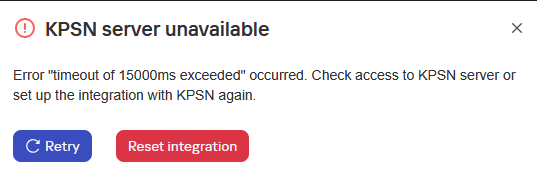](https://antiapt-community.ru/uploads/images/gallery/2025-12/K0WlJcegHUlU3ktn-image.png)
Текст ошибки
*KPSN server unavailable*
*Error "timeout of 15000ms exceeded" occurred. Check access to KPSN server or set up the integration with KPSN again.*
KSC web console log
```json
{"level":"info","version":"1.1.0.33","tags":[],"message":"[KPSN] [>>>] executeCommand in productApi start","timestamp":"2025-03-05T13:37:29.721Z","component":"plugin_kpsn","data":{"logContext":{"operationId":"wh8yi1SepJ","pluginVersion":"1.1.0.33","pluginApiMethod":"executeCommand"}}}
{"level":"info","version":"1.1.0.33","tags":[],"message":"[KPSN] executeCommand start","timestamp":"2025-03-05T13:37:29.721Z","component":"plugin_kpsn","data":{"logContext":{"operationId":"wh8yi1SepJ","pluginVersion":"1.1.0.33","pluginApiMethod":"executeCommand"},"payload":"IssueUserToken"}}
{"level":"info","version":"1.1.0.33","tags":[],"message":"[KPSN] get user access token","timestamp":"2025-03-05T13:37:29.722Z","component":"plugin_kpsn","data":{"logContext":{"operationId":"wh8yi1SepJ","pluginVersion":"1.1.0.33","pluginApiMethod":"executeCommand"},"payload":{"serverId":"fb5e4e2c-fbfc-424e-a1c2-79d65e651239","userId":"sid_010500000000000515000000E2CA5270A67C21589095F045F4010000","userName":"LAVKSCKPSN\\Administrator","accessRights":{"FUNC_AREA_KPSN_API":4,"FUNC_AREA_KPSN_CONFIGURATION":4,"FUNC_AREA_KPSN_FILE_REPUTATION":4,"FUNC_AREA_KPSN_URL_REPUTATION":4}}}}
{"level":"info","version":"1.1.0.33","tags":[],"message":"[KPSN] [PerServerStorage] getTenantId: no tenant id","timestamp":"2025-03-05T13:37:29.722Z","component":"plugin_kpsn","data":{"logContext":{"operationId":"wh8yi1SepJ","pluginVersion":"1.1.0.33","pluginApiMethod":"executeCommand"}}}
{"level":"info","version":"1.1.0.33","tags":[],"message":"[KPSN] [PerServerStorage] getValue start","timestamp":"2025-03-05T13:37:29.722Z","component":"plugin_kpsn","data":{"logContext":{"operationId":"wh8yi1SepJ","pluginVersion":"1.1.0.33","pluginApiMethod":"executeCommand"},"payload":{"key":"kpsn-backend-info","fullKey":"kpsn-backend-info"}}}
{"level":"info","version":"1.1.0.33","tags":[],"message":"[KPSN] [PerServerStorage] getValue success: key: \"kpsn-backend-info\"","timestamp":"2025-03-05T13:37:29.728Z","component":"plugin_kpsn","data":{"logContext":{"operationId":"wh8yi1SepJ","pluginVersion":"1.1.0.33","pluginApiMethod":"executeCommand"}}}
{"level":"warn","version":"1.1.0.33","tags":[],"message":"[KPSN] [ApiClient] https://lavkpsn4test.vm.org:443 is unavailable.","timestamp":"2025-03-05T13:37:44.758Z","component":"plugin_kpsn","data":{"logContext":{"operationId":"wh8yi1SepJ","pluginVersion":"1.1.0.33","pluginApiMethod":"executeCommand"}}}
{"level":"info","version":"1.1.0.33","tags":[],"message":"[KPSN] [PerServerStorage] getTenantId: no tenant id","timestamp":"2025-03-05T13:37:44.758Z","component":"plugin_kpsn","data":{"logContext":{"operationId":"wh8yi1SepJ","pluginVersion":"1.1.0.33","pluginApiMethod":"executeCommand"}}}
{"level":"info","version":"1.1.0.33","tags":[],"message":"[KPSN] [PerServerStorage] getValue start","timestamp":"2025-03-05T13:37:44.758Z","component":"plugin_kpsn","data":{"logContext":{"operationId":"wh8yi1SepJ","pluginVersion":"1.1.0.33","pluginApiMethod":"executeCommand"},"payload":{"key":"kpsn-backend-info","fullKey":"kpsn-backend-info"}}}
{"level":"info","version":"1.1.0.33","tags":[],"message":"[KPSN] [PerServerStorage] getValue success: key: \"kpsn-backend-info\"","timestamp":"2025-03-05T13:37:44.766Z","component":"plugin_kpsn","data":{"logContext":{"operationId":"wh8yi1SepJ","pluginVersion":"1.1.0.33","pluginApiMethod":"executeCommand"}}}
{"level":"error","version":"1.1.0.33","tags":[],"message":"[KPSN] [<<<] executeCommand in productApi failure","timestamp":"2025-03-05T13:37:44.766Z","component":"plugin_kpsn","data":{"logContext":{"operationId":"wh8yi1SepJ","pluginVersion":"1.1.0.33","pluginApiMethod":"executeCommand"},"payload":{"message":"[NO_SERVER_ERROR]: timeout of 15000ms exceeded","type":"no working server"}}}
```
**Причина:**
KSC не может подключиться к KPSN
**Решение:**
Проверьте соединение через **tnc**
```bash
tnc lavkpsn4tests.vm.org -Port 443
```
Если IP-адрес присутствует, но в строке PingSucceeded указано значение False, то KSC сможет разрешить имя KPSN, но не сможет подключиться к порту 443.
В таких случаях необходимо проверить сетевые настройки.
Error: self-signed certificate
**Описание:**
[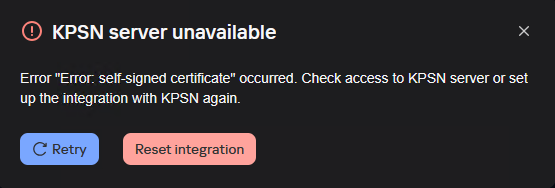](https://antiapt-community.ru/uploads/images/gallery/2025-12/plGUBO3EHkE2hKkj-image.png)
Текст ошибки
*KPSN server unavailable*
*Error "Error: self-signed certificate" occurred. Check access to KPSN server or set up the integration with KPSN again.*
**Причина:**
Неверный адрес в сертификате сервера.
**Решение:**
1. В KPSN выполните:```bash
kpsnctl certs print server
```
Проверьте имя KPSN (например, **DNS: ****lavkpsn4tests**)
Правильное имя должно быть: например, **lavkpsn4tests.vm.org** (FQDN!)
2. Измените имя в сертификате сервера, указав фактическое имя (FQDN)
```bash
kpsnctl certs rotate server --months 12 --external-hostname
```
Configurations files not downloaded
**Описание:**
[](https://antiapt-community.ru/uploads/images/gallery/2025-12/CN6nVd67pnuyYXuy-image.png)
Текст ошибки
*Configuration files not downloaded*
**Причина:**
После интеграции, активации и настройки вам потребуются конфигурационные файлы для подключения других наших продуктов: KATA, KSMG, KSC и др. Эта ошибка всегда означает, что KSC или KPSN не могут связаться с **ksn-pub-5.kaspersky-labs.com****Решение:**
Проверьте соединение как через TNC, так и через Telnet.
Если проверка соединения прошла успешно, проверьте аппаратное или программное обеспечение для анализа трафика. Указанный URL-адрес должен быть исключен из анализа трафика.